---
title: "Adding Opensense fields in Pardot"
slug: "adding-opensense-fields-in-pardot"
description: "Create the sgenads and sgentags custom prospect fields in Pardot (Marketing Cloud Account Engagement), so Opensense can target banners from Pardot data."
updated: 2024-01-13T04:50:53.000Z
canonical: "https://help.opensense.com/docs/adding-opensense-fields-in-pardot"
---
> ## Documentation Index
> Fetch the complete documentation index at: https://help.opensense.com/llms.txt
> Use this file to discover all available pages before exploring further.
# Adding Opensense fields in Pardot
## Overview
To target Opensense banners from Pardot (now Salesforce Marketing Cloud Account Engagement), add two custom prospect fields in Pardot: `sgenads` and `sgentags`. Opensense reads these fields to decide which banner each recipient sees. For how the two fields work, see [Applying targeting for Opensense Real Time Personalization banners (classic UI)](https://help.opensense.com/docs/applying-targeting-for-opensense-real-time-personalization-banners).
## Adding the Opensense fields
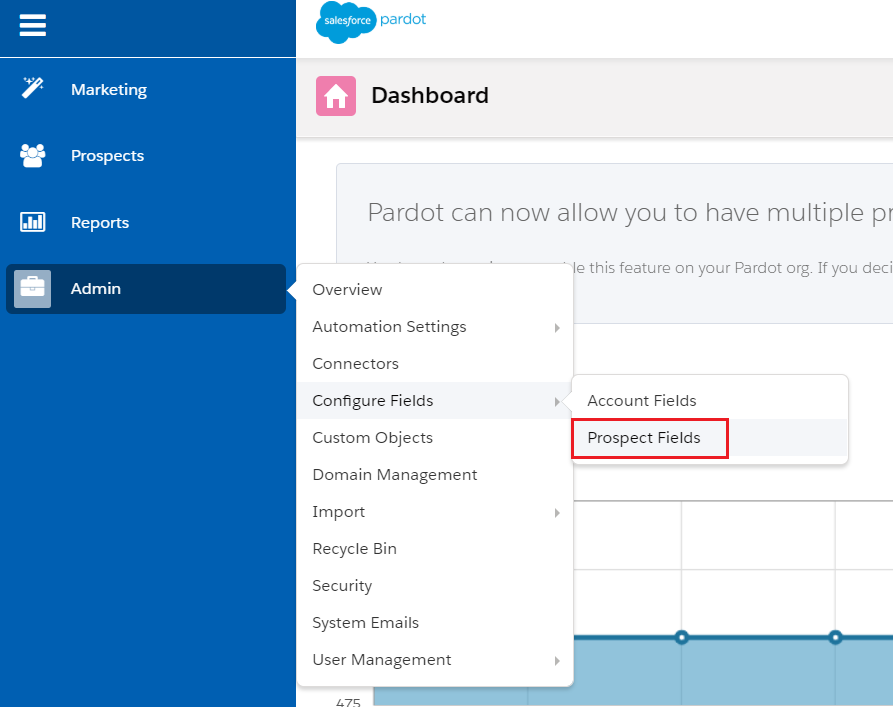
1. Open the **Prospect Fields** page (**Admin** > **Configure Fields** > **Prospect Fields**).
 2. Select **+ Add Custom Field**.
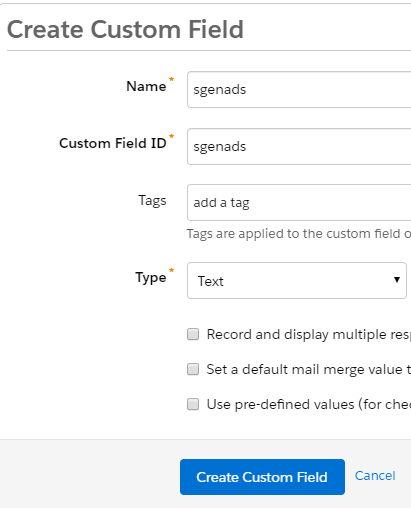
3. Create the `sgenads` field: set **Name** to `sgenads`, **Custom Field ID** to `sgenads`, and **Type** to **Text**.
2. Select **+ Add Custom Field**.
3. Create the `sgenads` field: set **Name** to `sgenads`, **Custom Field ID** to `sgenads`, and **Type** to **Text**.
 4. Select **Create Custom Field**.
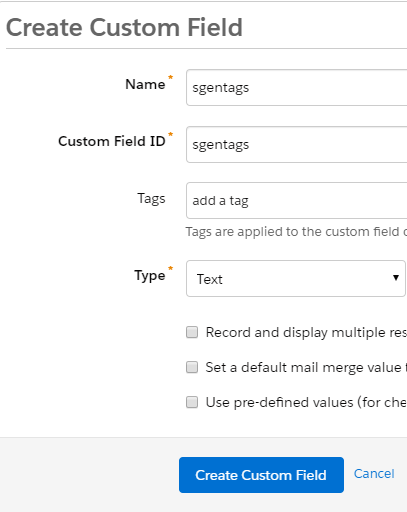
5. Repeat for the `sgentags` field: **Name** `sgentags`, **Custom Field ID** `sgentags`, and **Type** **Text**.
4. Select **Create Custom Field**.
5. Repeat for the `sgentags` field: **Name** `sgentags`, **Custom Field ID** `sgentags`, and **Type** **Text**.
 The **Name** is used internally, for identification, and prospects can't see it.
Both fields now appear in your list of custom fields, with the type **Text**.

## What's next
- [Setting up the Pardot connector in Opensense (classic UI)](https://help.opensense.com/docs/setting-up-pardot-opensense-side): connect Opensense to Pardot.
The **Name** is used internally, for identification, and prospects can't see it.
Both fields now appear in your list of custom fields, with the type **Text**.

## What's next
- [Setting up the Pardot connector in Opensense (classic UI)](https://help.opensense.com/docs/setting-up-pardot-opensense-side): connect Opensense to Pardot.