---
title: "Conditional fields (legacy templates)"
slug: "conditional-fields-pre-2022-legacy"
description: "Wrap a field in legacy if tags, like {if_phone}, so it appears only when the user has a value, and use nif tags to show fallback text when it is empty."
updated: 2024-01-14T02:23:51.000Z
canonical: "https://help.opensense.com/docs/conditional-fields-pre-2022-legacy"
---
> ## Documentation Index
> Fetch the complete documentation index at: https://help.opensense.com/llms.txt
> Use this file to discover all available pages before exploring further.
# Conditional fields (legacy templates)
## Overview
This article is for pre-2022 templates, built with our legacy HTML syntax: **use it if your tags are in `$tag;` format.** If you use Liquid templates, see [Conditional fields (Liquid templates)](https://help.opensense.com/docs/conditional-fields-new-liquid-templates).
- You can make a field optional if some users use it and others don't. Optional fields are removed automatically from email signatures that don't use the field.
- You can wrap IF statements around any signature element, to make it appear only if that field is used.
## Conditional fields that share a line
**HTML code.** Each field has its own `{if_field}` block, and a nested condition shows the separator only when both fields have values:
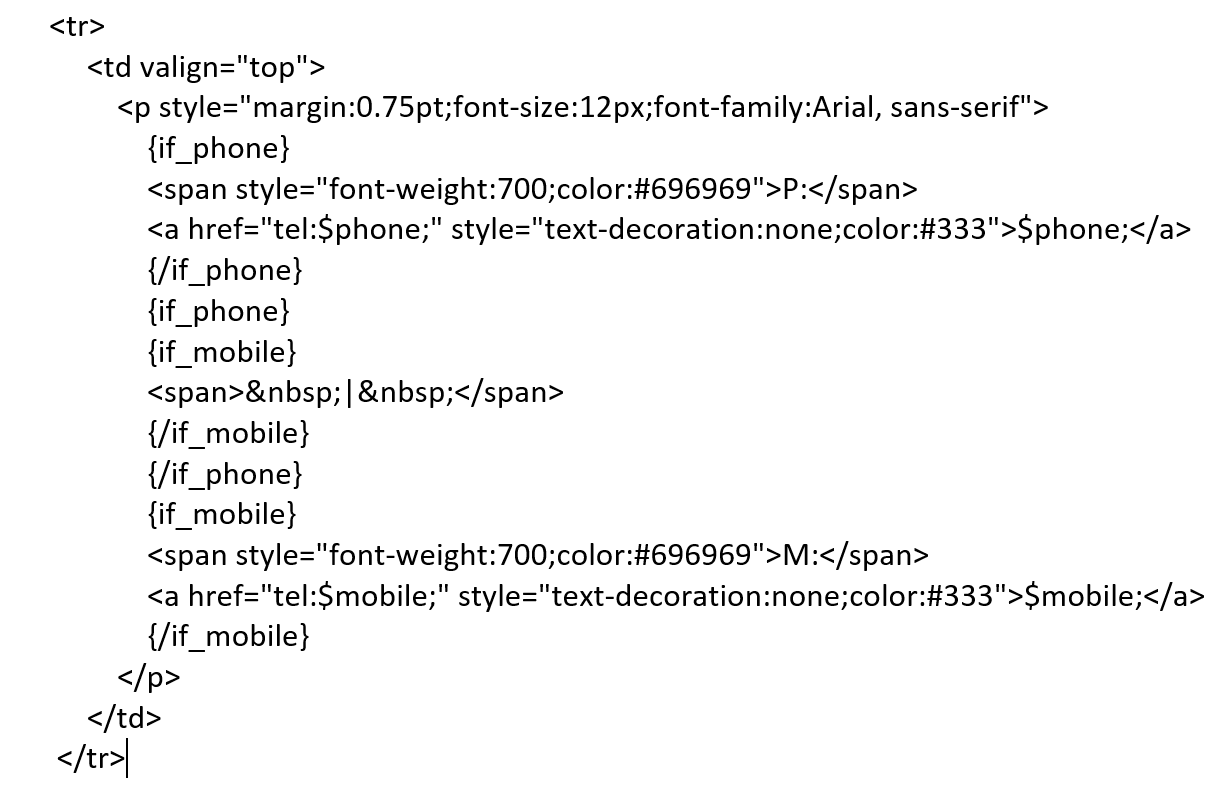 **Signature preview with logic:**
 **Recipient's email rendering.** If either field is removed, the separator line is removed too.
 ## A conditional field on its own line
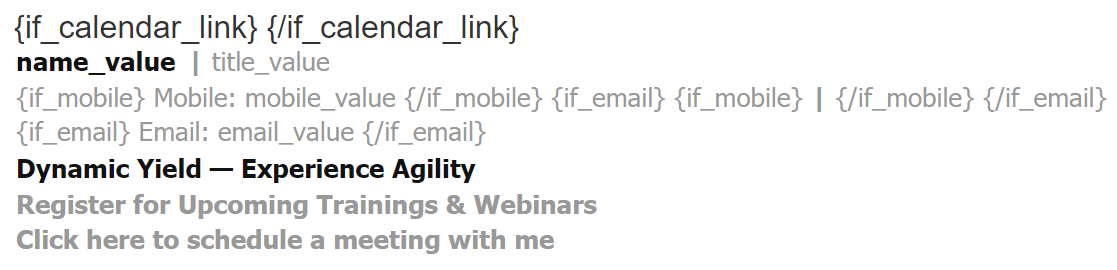
**HTML code.** The whole table row is wrapped in the field's if tags:
## A conditional field on its own line
**HTML code.** The whole table row is wrapped in the field's if tags:
 **Signature preview with logic:**
 ## "Not if" logic
Need "not if" logic? Opensense can do this too. Wrap your HTML code with `{nif_field}Alternative Text{/nif_field}` instead.
For example: `{nif_phone}1-800-MAINLINE{/nif_phone}`
## What's next
- [Hidden fields (legacy templates)](https://help.opensense.com/docs/hidden-fields-pre-2022-legacy)
- [HTML and field types (legacy templates)](https://help.opensense.com/docs/html-field-types-1)
For further help, contact Opensense Support at [help@opensense.com](mailto:help@opensense.com).
## "Not if" logic
Need "not if" logic? Opensense can do this too. Wrap your HTML code with `{nif_field}Alternative Text{/nif_field}` instead.
For example: `{nif_phone}1-800-MAINLINE{/nif_phone}`
## What's next
- [Hidden fields (legacy templates)](https://help.opensense.com/docs/hidden-fields-pre-2022-legacy)
- [HTML and field types (legacy templates)](https://help.opensense.com/docs/html-field-types-1)
For further help, contact Opensense Support at [help@opensense.com](mailto:help@opensense.com).