

Business card overview
Overview
Section titled “Overview”Opensense Digital Business Cards turn your email signature data into branded digital business cards. Each card uses your logo and brand colors, and has a personal QR code that people can scan to save the contact.
To manage business cards, select Business Cards in the Opensense portal. Design the cards in Designer Studio, then assign them to groups of users in Routing.
Benefits
Section titled “Benefits”-
Easy sharing
Users share their card by QR code, SMS, or email.
-
On brand
Designer Studio applies your logo, colors, and fonts to every card.
-
Central control
Add, update, or remove employee cards from one place, so every card stays consistent.
-
Always accurate
Cards use your email signature data, so contact details stay up to date.
-
Brand recognition
Every scan shows your brand to a new contact.
-
Ready to scale
Deploy across teams with directory sync, backed by U.S.-based customer success.
What you can do
Section titled “What you can do”- Set up branding
- Add your company name, website, colors, fonts, logo, and brand icon. The preview updates as you go.
- Create a business card
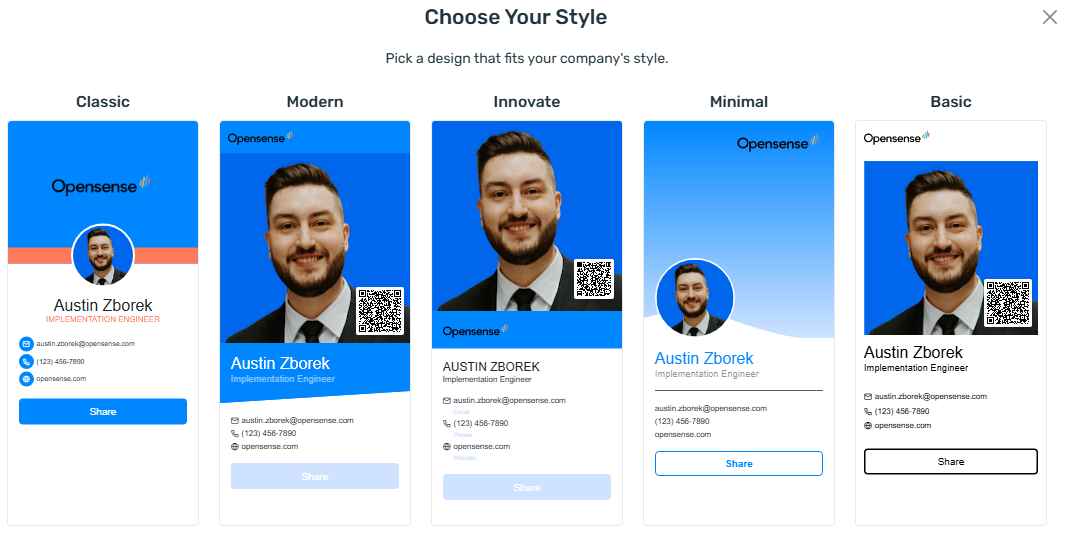
- Pick a template style: Classic, Modern, Innovate, Minimal, or Basic.
- Manage card templates
- Sort, search, edit, clone, and delete templates. A Routing tag shows which templates are assigned.
- Assign cards to groups
- Create a route that gives a card template to one or more groups.
- Set route priority
- Drag routes into order. Higher routes take precedence over lower ones.
- Look up a user's card
- See which business card a user has now.
What’s next
Section titled “What’s next”- Designing business cards in Designer Studio: set up branding and design business card templates.
- Assigning business cards in Routing: assign business cards to groups and set route priority.
- Digital Business Cards on opensense.com: product details and examples.