

How do I share MySig manually with new hires?
Overview
Section titled “Overview”MySig is a hosted signature setup page from Opensense. Use it to share signatures with your employees, for example new hires. Your MySig page is at https://smart.customer.com/mysig, where customer.com is your company’s domain. For example, Opensense’s MySig link is https://smart.opensense.com/mysig.
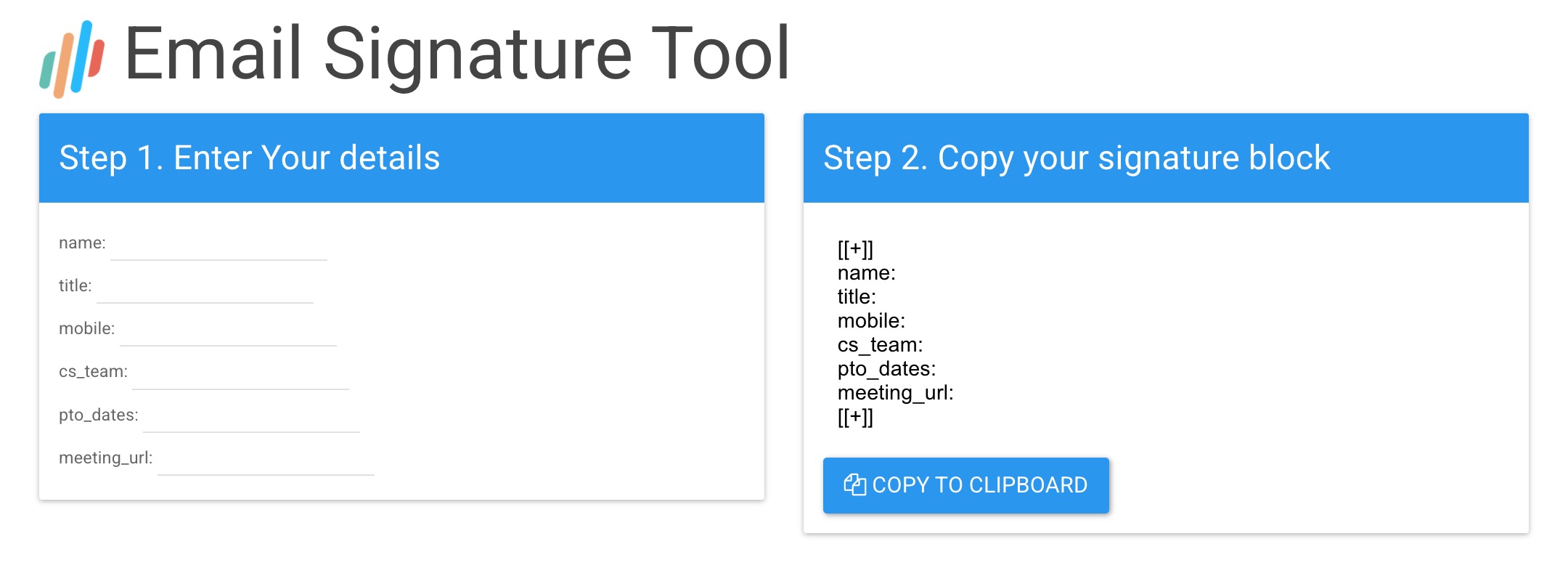
Sharing MySig with a new hire
Section titled “Sharing MySig with a new hire”- Send the employee your MySig link through any channel you prefer, such as email, chat, or onboarding documents.
- Ask the employee to enter their details under Step 1 on the MySig page.
- When the form is complete, a custom signature block appears under Step 2. Ask the employee to click Copy to Clipboard and paste the block into their email signature settings, for example in Outlook, Gmail, or Apple Mail.
- Ask the employee to test the signature: compose a new email and send it to a different email address, such as a team member or their personal email. The signature should render correctly.
What’s next
Section titled “What’s next”- How does Opensense work with Microsoft 365?
- How does Opensense work with Google Workspace?
- Signature management and deployment FAQ: answers to other common signature questions.