

How do I update permissions for the Opensense platform?
Overview
Section titled “Overview”Admins update a user’s permissions by assigning roles on the user’s Settings tab. Roles grant access to sections of the platform, or read-only access. Assigning the right roles improves security, delegates work, and controls access to sensitive information in your organization.
Updating a user’s permissions
Section titled “Updating a user’s permissions”- Go to the Opensense accounts page and sign in.
- In the navigation pane, select Manage > Users.
- Use the search bar to find the user.
- Click the user’s profile card, then select the Settings tab.
- In Roles, select the roles for the user. You can assign more than one role.
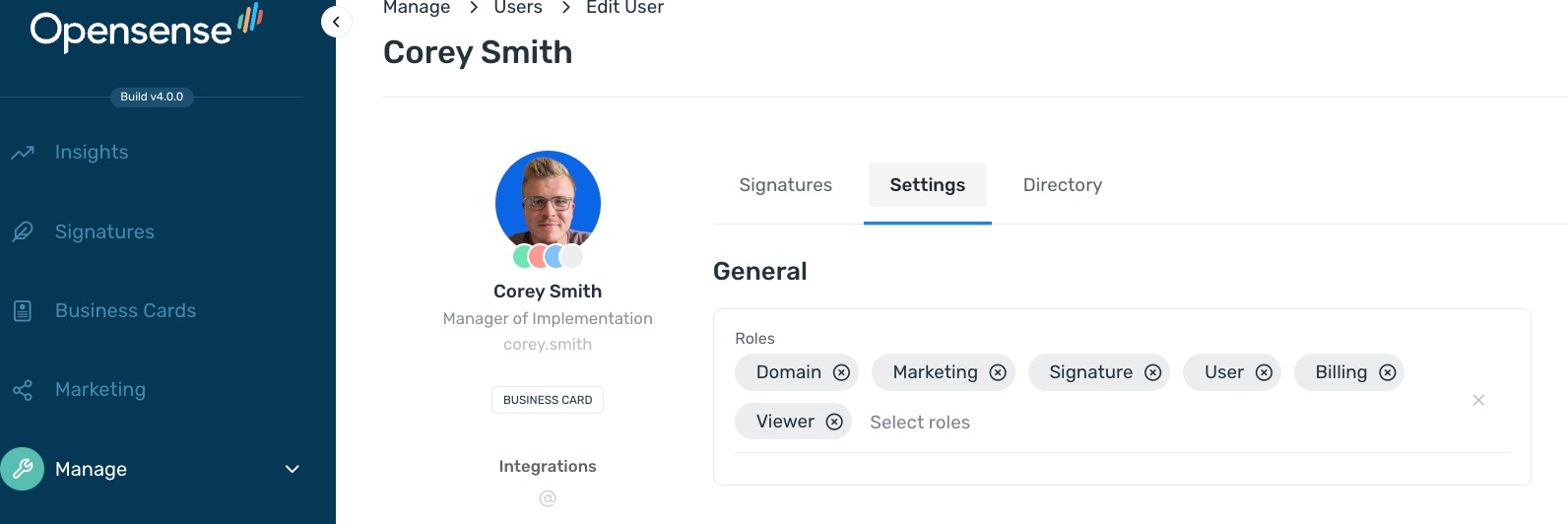
- User
- Basic access. The user cannot make changes or see account-wide information.
- Signature
- Admin control of the Signatures section.
- Marketing
- Admin control of the Marketing section.
- Domain
- Admin control of the Manage section, including domain settings and user information.
- Billing
- Billing notifications and alerts about account charges.
- Viewer
- Read-only access. The user cannot make changes to any part of the platform.
For the pages each admin role can open, see Opensense portal admin roles.
What’s next
Section titled “What’s next”- Opensense portal admin roles: page access for each admin role.
- Signature management and deployment FAQ: answers to other common signature questions.