

How does Opensense work with Google Workspace?
Overview
Section titled “Overview”Opensense integrates with Google Workspace through Gmail’s Content Compliance engine and the Gmail API. Together, they let Opensense manage email signatures centrally, enforcing brand consistency, compliance requirements, and marketing campaigns across outbound email. Depending on your deployment method, signatures are applied server-side after send, pushed into Gmail’s native signature settings, or both.
How the integration works
Section titled “How the integration works”Opensense connects to Google Workspace through two components, which work together depending on your deployment method:
- Content Compliance rules in the Google Admin console
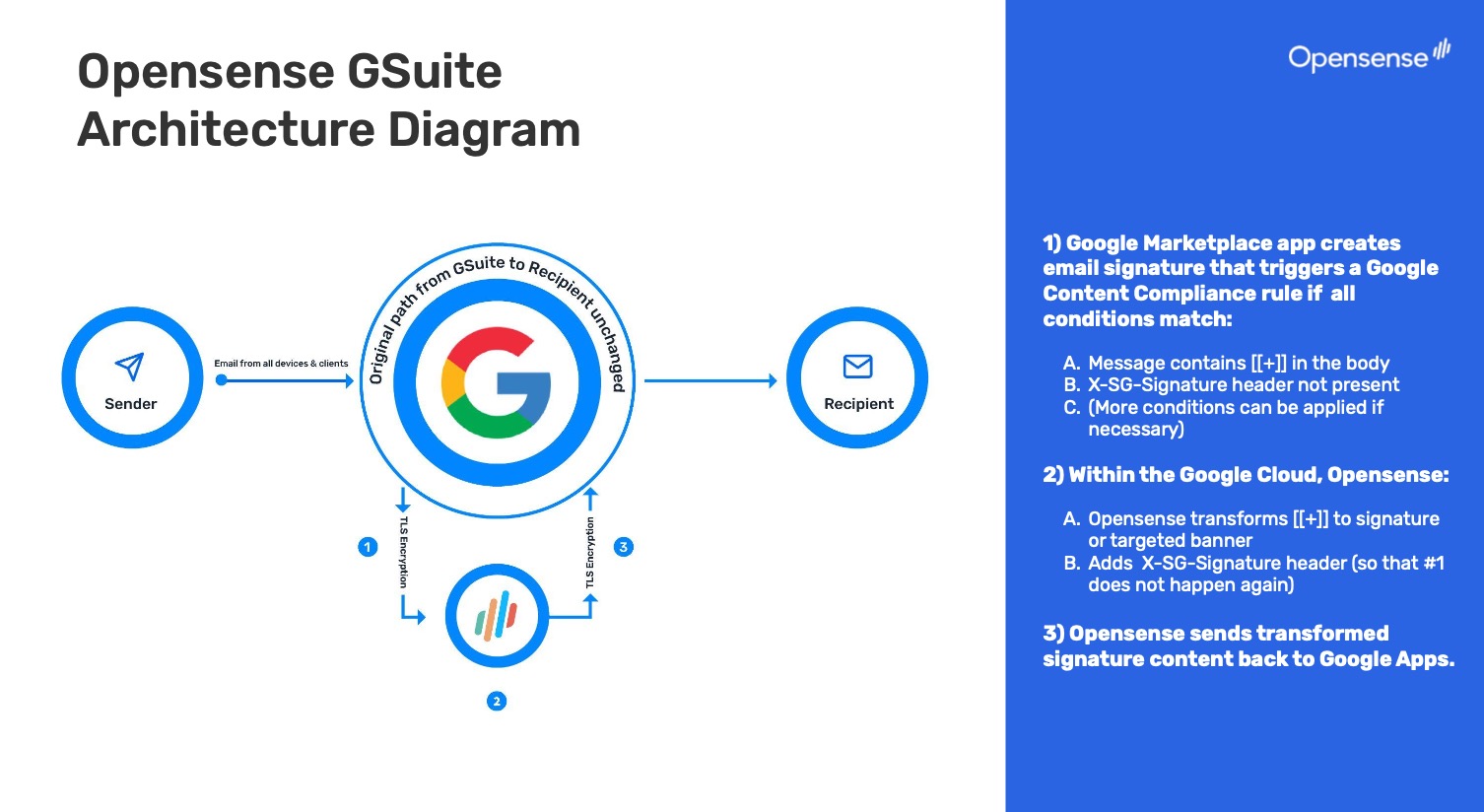
- Route qualifying outbound emails from Gmail to Opensense. Opensense applies the correct HTML signature and any configured marketing banners, then returns the email to Gmail through TLS for final delivery. Required for Stamping and Plain Text Block push deployments.
- The Opensense Google Workspace Marketplace app
- Installed during the integration process. Grants Opensense permission to sync user data from Google Directory and, where applicable, push signatures directly into users' Gmail native signature settings. Opensense never accesses inbox contents. For the full list of permissions granted during installation, see Google Workspace API scopes.
User data, including name, title, phone, and department, comes from Google Directory, and syncs to Opensense to fill in each signature dynamically. The combination of components you use depends on your deployment method.
Deployment methods
Section titled “Deployment methods”Opensense supports three deployment methods for Google Workspace. You can use them on their own, or together.
-
Server-side, after send
Stamping through Content Compliance
A Google Workspace Super Admin configures a Content Compliance rule that routes qualifying outbound emails to Opensense. Opensense applies the full HTML signature and any banners after send, then returns the email to Gmail for delivery.
- Works across all devices and email clients, because it operates at the mail flow level
- No compose visibility
- Full compliance enforcement, recipient-based targeting, and advanced analytics
-
Pushed, transformed at send
Plain Text Block push
The Opensense Pusher puts a plain text signature block into each user's Gmail native signature settings. When the user sends, a Content Compliance rule routes the email to Opensense, which transforms it into the full HTML signature.
- Compose visibility, with server-side control and the full marketing feature set
- If the Pusher can't reach a user's environment, the block can be delivered by email instead, or users can save it themselves with MySig
-
Pushed, no routing
Visual Preview push
The Pusher puts the full rendered HTML signature into each user's Gmail native signature settings. The signature is already there client-side, so no routing to Opensense is needed at send time.
- Designed for organizations that can't allow third-party mail flow, for privacy or compliance reasons
The Opensense Google Add-on
Section titled “The Opensense Google Add-on”The Opensense Google Add-on brings signature field management directly into Gmail. A Google Workspace Super Administrator deploys it centrally, and it appears automatically in the Gmail sidebar. No individual installation is required, and there’s no propagation delay.
Users can view their signature fields, edit any unlocked fields, and select Update Signature to save their changes. Updates sync immediately to Opensense. When a user edits an unlocked field, the sync between that field and the original directory source (Google Directory, Okta, and so on) is intentionally broken for that field, so the user’s input isn’t overwritten on the next automatic directory sync.
If auto-push is turned on for the user’s group in Opensense, saving a field update pushes the updated signature back to the user’s Gmail native signature settings automatically. The push type (Plain Text Block or Visual Preview) is configured per group. Without auto-push, signature updates need an admin to push again.
For full add-on documentation, including auto-push configuration, field locks, Custom Compose Fields, and Signature Fields Only, see the Google Add-on overview.
Key integration dependencies
Section titled “Key integration dependencies”- Google Workspace account
- Required for all users. Consumer Gmail accounts aren't supported.
- Super Admin access
- Required to configure Content Compliance rules, and to install the Opensense Google Workspace Marketplace app.
- Opensense Google Workspace Marketplace app
- Installed during integration. Grants Opensense permission to sync Google Directory data and push signatures to Gmail settings. Push methods need the Gmail manage settings permission scope.
- Content Compliance rule
- Required for the Stamping and Plain Text Block push methods. Configured in the Google Admin console to route qualifying emails to Opensense.
- DNS records
- SPF and other DNS entries must be updated for all sending domains, to maintain deliverability.
For the full integration setup requirements, see Google Workspace integration overview (change request).